
A Two-Bay Car Wash Lets the Weather Switch Its Screen Visuals
Nobody washes a car in the rain, and everybody washes it the first sunny day after. This car wash used to change its roadside screen by hand — when someone remembered. Now the weather does it: three AI-generated visuals, three trigger scripts, zero manual switching.
This is a composite story drawn from how small businesses actually use DigiOnGo. Details are typical rather than tied to one named client, and we don't quote invented statistics.
The business
A two-bay car wash on a busy road out of town, run by the owner with two washers on shift. Most customers are drive-by: they see the place, decide in the ten seconds it takes to pass, and either pull in or don't. Demand swings entirely with the weather — dead on rainy days, queues on the first sunny morning after.
One tall portrait screen at the entrance, facing the road, on an Android stick with DigiOnGo. It was installed to replace a printed banner, and for a year it did the same job the banner did: showed one price list, in all weather.
The problem: the right message depends on the sky
The owner knew exactly what the screen should say on each kind of day. Sunny and warm: "wash now, it'll stay clean". Rain: don't advertise a wash nobody wants — sell interior cleaning or a booking for tomorrow. Frost: winter wash with wax and de-icing. The messages existed. The problem was two-fold: there was nothing to show them with, and nobody to switch them.
Visuals first. Stock photos of shiny cars look like insurance ads; a photographer for three seasons of shots was never going to happen for a two-bay wash. Then the switching. The owner tried changing the slide from his phone in the morning based on the forecast. It worked for about two weeks. The weather changes at 14:00, the owner is under a car, and the screen keeps promising sunshine in a downpour.
What they tried before
- One permanent price-list slide — accurate, and identical on the best and worst days for business.
- Stock photos of shiny cars — looked like a bank ad, not a car wash by the road.
- Switching slides by hand from the forecast — lasted two weeks, then the weather and the owner stopped agreeing.
- A weekly schedule ("weekend = promo") — fine until the weekend was rain.
The screen ended up telling drivers in a thunderstorm that today was a great day for a wash. It's the kind of thing regulars notice and joke about, and passers-by simply stop believing.
How it works now
Two DigiOnGo features do the whole job together. The AI Image Generator makes the visuals; trigger scripts in the playlist editor decide which of them plays, based on the weather at the screen's own location and on time. The owner set it up once, in one evening.
One visual per kind of weather
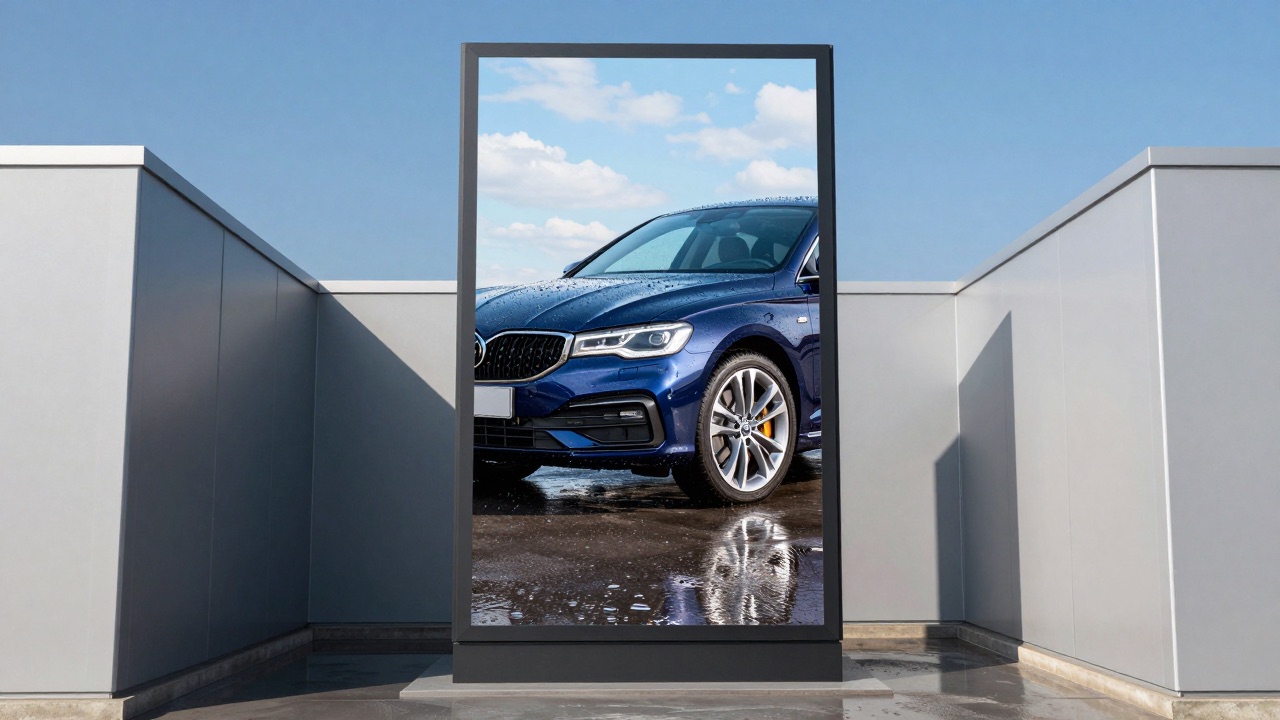
Three prompts, three images, all 9:16 for the roadside screen: a gleaming car in sunshine, a spotless interior with rain on the window behind it, a car with frost on the roof and a warm wax-shine hood. Generated into a folder called "Weather".
A trigger script on each item
In the playlist editor each of the three items gets a trigger script. "Sunny": cloudiness = clear AND temperature above +20 °C. "Rain": precipitation = rain. "Frost": temperature below 0 °C. Rules inside a script are combined with AND.
The screen's address is the sensor
The car wash's point in DigiOnGo has its address and coordinates. Weather rules are checked against the forecast for that exact spot — not the city centre — so a screen on the edge of town gets the edge-of-town weather.
A time rule for the evening
A fourth item — "Evening wash, Friday and Saturday 18:00–22:00" — uses a time rule instead of weather. Everything without a script (prices, opening hours) plays as usual, in every weather.
Prompts they actually use
The three weather visuals came out of one sitting. The trick was to put the weather into the picture itself, so the image matches what the driver sees through the windscreen.
“Glossy dark blue car just washed, water beads on the paint, bright sunshine and blue sky, wet asphalt reflecting the sky, small car wash in the background, fresh clean atmosphere”
Trigger script "Sunny": cloudiness = clear AND temperature above +20 °C. Overlay: "Wash today — it'll stay clean".
“Spotless car interior, clean leather seats and dashboard, view through the windscreen of rain drops and grey sky outside, cozy dry inside, detailing photography”
Trigger script "Rain": precipitation = rain. Overlay: "Rainy day? Interior cleaning — or book tomorrow's wash".
“Car with a light layer of frost on the roof and a gleaming freshly waxed hood, winter morning, low sun, cold blue light with warm reflections, clean driveway”
Trigger script "Frost": temperature below 0 °C. Overlay: "Winter wash + wax + de-icer".
The routine
There isn't one, and that is the point. The owner opens the dashboard when a promo changes — new winter package, new price — swaps the overlay text or regenerates one visual, and the trigger scripts stay as they are. The playlist history shows when each script fired, so he can see that "Rain" ran three days last week without checking the sky.
Seasonal edits happen twice a year: the frost threshold goes to 0 °C in November and the sunny threshold to +20 °C in April. The scripts are saved as favourites in the trigger editor, so reusing them on a second screen is one click.
What changed
A car wash counts cars, not clicks. The owner talks about the screen finally saying the right thing at the right moment — and about not having to think about it.
| Before | Now |
|---|---|
| One slide in all weather; a thunderstorm and a heatwave got the same message. | Three weather visuals and an evening promo, switched by trigger scripts on the screen's own forecast. |
| Switching by hand in the morning — wrong by the afternoon. | Nobody switches anything. The playlist history shows what fired and when. |
| Rainy days: a wash promo nobody wanted. | Rainy days: interior cleaning and "book tomorrow" — a service people actually buy in the rain. |
| Stock car photos that looked like an insurance ad. | AI visuals with the weather in the picture — sun, rain drops, frost — matching the view through the windscreen. |
Tips that came out of it
- Put the weather in the prompt. "Rain drops on the window behind" makes the rainy-day visual believable in a way a generic clean car never is.
- Combine rules with AND deliberately. "Clear" alone fires on a clear −5 °C morning; add "temperature above +20 °C" for the summer message.
- Set the point's address precisely. The forecast is checked for the screen's coordinates, and an out-of-town wash is not the city centre.
- Keep something without a script in the playlist — prices, hours — so the screen is never empty when no rule matches.
- Save scripts as favourites. The second screen, or the second location, takes a minute instead of an evening.
Where it doesn't help
Triggers follow the forecast for the point, not the puddle in front of the bay. A brief shower between forecast updates can slip through; the owner keeps the rain message useful even on a merely grey day ("interior cleaning" is a good sell in any weather).
Prices stay in the overlay. The three visuals haven't changed since spring; the numbers on top have changed four times. Generated images are the backdrop, the playlist text is the offer.
Let the weather run your screen
Generate a visual per condition with AI Image Generator, attach a trigger script in the playlist editor, and the screen switches itself. Both are in your DigiOnGo dashboard today.
Related Articles
How a Small Coffee Shop Makes Its Own Screen Ads With AI
A 30-seat coffee shop with no designer keeps its menu screen and window display fresh every week — prompts, routine, and what actually changed.
A Two-Chair Barbershop Fills Its Window Screen With AI Visuals
A two-chair barbershop replaced a static window poster with a vertical screen — and fills it with AI-generated visuals for services, promos and slow-hour offers.
A Small Dental Clinic Runs Calm Waiting Room Screens With AI
A three-dentist clinic replaced TV news in the waiting room with calm, on-brand AI-generated visuals and service information — no agency, no stock photos.